


Windows 8 is all about the apps, so it's important to find the best ones for your unique needs. Unfortunately, you need to sift through a lot of crap apps in the process, especially if you're not using a Windows 8 tablet; desktop and laptop PC users don’t need to worry about the lion’s share of Windows 8 apps, because they're usually single-purpose tools designed to replicate the functionality of a full PC on a mobile device. Since you have access to a full Windows desktop you don’t need just another way to look at photos or surf the Web—you need a way to do those things better.
With that in mind, we’ve taken the liberty of sharing some of our favorite Windows 8 apps in order to help you get up to speed as quickly as possible so that you can take advantage of all that Windows 8 can offer. Microsoft does a pretty decent job of covering your basic computing needs with apps like Messaging, Mail, SkyDrive and Skype, but there are a few excellent third-party apps you should download post-haste.
Problem is, the Windows Store is still in its infancy and thus lacks a lot of free apps for well-known services such as Twitter and Facebook; but even though Microsoft’s digital distribution platform can’t yet match the variety or breadth of apps available in the Apple and Google ecosystems, it still has more than enough Windows 8 apps to make your head spin. We sifted through dozens and dozens of the most popular Windows 8 apps available at launch, then tested a few dozen more and compiled this list of our favorites. While these apps may not satisfy all your computing needs (we just couldn't find a great Twitter management app, for example) they should help you get the most from your Windows 8 PC.
Netflix

The Netflix app for Windows 8 is free to download and easy to use, with an attractive tile-based interface that's intuitive to navigate on a touchscreen. Streaming movies through the app also seems smoother than streaming them through your browser, which is reason enough to launch Netflix right from your Start screen.
IM+

Everyone needs a good instant messaging client, and although the Windows 8 Messaging app is functional enough, as of publication it supports only the Windows Messenger and Facebook Chat services. That may change in the future, but if you want to chat with all your friends right now across disparate networks (including AIM, Facebook, GChat, ICQ, and Jabber) Shape's IM+ app has you covered. It’s free, it supports a wide variety of chat networks, and it lets you enable push notifications so that you can stay on top of your social life no matter what app you’re using.
TuneIn Radio

Over 14,000 radio stations exist in the United States, and TuneIn Radio will let you listen to almost all of them, plus a bunch more from across the world, for free. While you could always stream your favorite radio station from your browser, TuneIn does a fantastic job of presenting a huge assortment of AM/FM radio streams and podcasts in one slick app that’s simple to navigate. The sound quality is great, playback rarely stutters, and the TuneIn live tile displays information on what’s currently playing. You can choose from over 70,000 talk shows, sports broadcasts, news programs, local radio broadcasts, and podcasts.
eBay

The eBay app is beautiful, free and easy to use, but most importantly it takes advantage of the Windows 8 Start screen in ways that make it more useful to savvy shoppers than the standard eBay website. You can use the app to quickly and efficiently sort through your tracked auctions and saved eBay searches, and you can pin the Daily Deals tracker to your Start screen to stay abreast of savings opportunities at a glance.
Microsoft Minesweeper

Windows 8 is the only version of Windows in recent memory that doesn't come with Minesweeper preinstalled, but you can download it for free if you’re feeling nostalgic. At its core the classic guessing gameplay of Minesweeper is the same as it ever was, but Microsoft has updated the Windows 8 version with a fresh coat of paint and some new features, including an Adventure mode with traps and treasure, online leaderboards, and the ability to log in with your Xbox Live account and see when your friends are online or earn Minesweeper Achievements.
Clock

Jujuba Software's app does what it says on the tin, placing a live tile on your Start screen that shows the time. You might be wondering why you'd need an app to do such a simple thing; surprisingly, in Windows 8, Microsoft actually failed to include an option for users to see what time it is without pulling up the Charms bar to display the system clock. The Clock app is a free, simple alternative for anyone who wants the convenience of being able to check the time at a glance without pulling up a menu, and you can also use it to set a timer, run a stopwatch, or set alarms for yourself.
SmartGlass
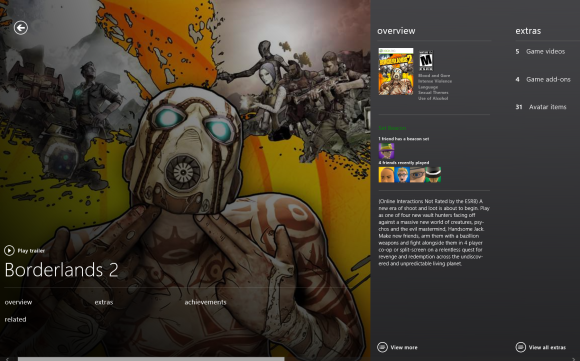
Microsoft's SmartGlass functions as a second screen for your Xbox 360, keeping track of what you’re watching or playing and offering complementary information such as Achievement charts and additional video content. You can also use your PC as a remote control for your Xbox 360, launching videos or games on your HDTV from within SmartGlass. In addition, the app allows you to track real-time stats while watching sports, queue up songs in a dance game, or check your in-game GPS while racing against your friends in a motocross title. SmartGlass has been available in the Store for some time now, but Microsoft is updating the app with a bevy of new features to accompany the Windows 8 launch.
StumbleUpon

Whether you’re an avid Stumbler or a first-time user, consider adding the StumbleUpon app to your new Start screen. StumbleUpon is a fantastic way to discover new and interesting things online, and the Windows 8 app makes it even easier to stumble upon your next favorite video or article by updating the live tile with websites tailored to match your tastes. Installing the Windows 8 StumbleUpon app will also allow you to share websites, audio, and video with StumbleUpon via the Share Charm. It's a great tool for injecting a little serendipity into your online existence, and it's completely free to use.
HowStuffWorks
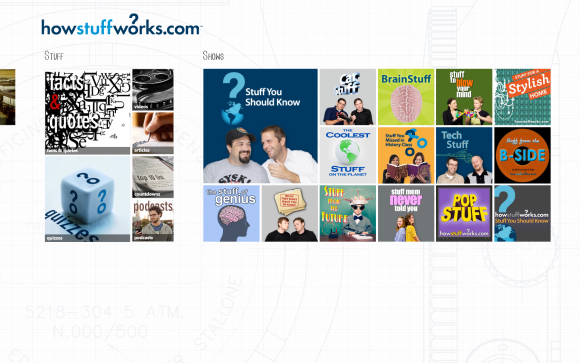
The HowStuffWorks Windows 8 app basically bundles all the excellent articles, videos and podcasts from the HowStuffWorks website into a package and plops it down on your Start screen with a live tile that updates you whenever there's something new to check out. The app itself has a few peccadilloes (the tiles look cramped together and the podcasts don't keep playing when you switch to another app) that suggest it was rushed out to hit the Windows 8 launch date, but HowStuffWorks is still a fantastic free app that deserves a permanent spot on your Start screen.
MovieGuide

Zühlke Engineering's MovieGuide app, a handy tool for movie nuts, combines the film trivia of IMDb, the variety of trailers on YouTube, and the list-making feature of Flixster into a single app. Some of the information on films and actors (especially the more obscure ones) is sourced from Wikipedia and can be a little anemic, but the beautiful design and easy discovery paths more than make up for that. Seasoned cinemagoers can probably skip this app, but it's perfect for budding film buffs.
Source: pcworld.com


.jpg)


