UPDATE FIXES VERIZON IPHONE 5 DATA GLITCH; CUSTOMERS WON'T BE CHARGED FOR OVERAGES

Verizon iPhone 5 customers may have noticed an issue wherein their phones gobbled up extra cellular data when they were theoretically connected to Wi-Fi networks. Those customers now have two bits of good news: There’s a special software update that fixes the problem, and they won’t be responsible for unexpected charges related to unintended network overages related to the issue that spurred the carrier update in the first place.

10 HOT IT SKILLS FOR 2013

The number of companies planning to hire tech professionals continues to grow, with 33% of the 334 IT executives who responded to Computerworld's 2013 Forecast survey saying they plan to increase head count in the next 12 months..

APPLE WARNS ICLOUD USERS OF LOOMING STORAGE LOSS

Apple on Monday began reminding some iCloud users that they will soon lose the 20GB of free storage they'd received when they migrated from MobileMe.

Nook Video set for fall premier

Barnes and Noble Tuesday announced that Nook Video will premiere this fall in the U.S. and UK. The service will offer access to movies and TV shows for streaming and download.

Eight simple steps to make the upgrade to iPhone 5 easier

A little planning can save time - and voice messages - when you upgrade to the new iPhone 5

Saturday, November 3, 2012

Can a refreshed Google Wallet finally take off?


A large challenge for Google on mobile payments is still one of availability. AT&T, T-Mobile and Verizon are working on their own mobile payment service, called Isis, and have resisted putting Google Wallet on their handsets.
That may be part of the reason why Google is getting more aggressive in offering Nexus phones that aren't tied to the major carriers. The recently-announced Nexus 4will be sold unlocked and contract-free for $300 and up.
Now, Google reportedly is testing a physical card for Google Wallet, which would work at stores that don't support tap-and-pay from mobile phones.
The Google Wallet card would store payment details from multiple credit and debit cards, Android Police reports, citing an anonymous source. Through the Google Wallet app, users select which of those payment methods to use by default, then swipe and sign the Google Wallet card as they would with a regular credit card.
The idea is that Google Wallet users can leave all their other credit cards at home. All they'd need is their smartphone and the Google Wallet card—and maybe some cash. Because the Wallet app can control which method of payment is associated with the card, it could make sense for users who spread their payments across multiple credit and debit cards.
Also, if the Google Wallet card is lost or stolen, users can cancel it, and won't have to cancel all their other credit and debit cards. In leaked screenshots, Google says it offers fraud monitoring and the ability to remotely disable the card at any time.

Changes for Google Wallet?

As Android Police notes, the physical card may be just a part of some big changes for Google Wallet. Other features may include support for transit cards, money transfers between users, and a “Wallet Balance” from which users can deposit and withdraw. Google has said that it wants to bring discount cards, tickets, and identification into Wallet to compete with the iPhone's Passbook feature.
Google may also be working on a way to bring a version of Wallet to other devices such as the iPhone. A recent sign-up page for news on “the next version of Google Wallet” asked visitors whether they used an Android device, an iPhone or “other.”
The iPhone doesn't support near-field communications, so any service would likely rely on barcode scanning instead.
Even if Google Wallet doesn't take off, the added features and availability should make it more useful. Ultimately, any mobile wallet service needs a clear answer for why people should use it instead of their existing cash and cards. It'll be interesting to see how Google answers that question when it's ready to show off what's next for Google Wallet.

Source: techhive.com


Friday, November 2, 2012

Cell-site outages fall to 19 percent in area hit by Sandy, FCC says


About 19 percent of cell sites in the area hardest hit by Hurricane Sandy were still out of service on Thursday as recovery was slowed by other network failures and power shortages, according to the U.S. Federal Communications Commission.
By 10 a.m. EDT Thursday, the outages had declined from about 22 percent of all cell sites in the region a day earlier, the FCC said in a statement on Thursday afternoon. That was an average across the area most affected by the storm, stretching across parts of 10 states. In addition, cable TV and cable Internet outages had been reduced to about 12 percent to 14 percent, the agency said.
"Overall, we're seeing both continued improvement in communications networks and also that much work remains to be done to restore service fully," FCC Chairman Julius Genachowski said in the statement. As a key part of the recovery effort, the agency is working with federal, state and local authorities to help get fuel to generators, he said.

Service gaps in hard-hit areas

There was steady improvement in the wired and wireless communications networks across the storm area, but restoration of service in the areas hardest hit, such as New York and New Jersey, has been more difficult, said David Turetsky, head of the FCC's Public Safety & Homeland Security Bureau. Some sites that could otherwise have come back online were held back by failures elsewhere in the communications infrastructure, he said.
The FCC said its Disaster Information Reporting System (DIRS) remained active, and the agency was still collecting data from carriers about the effects of the storm.
Emergency 911 calls are being received throughout the storm-affected area, though in some cases they are being re-routed to other 911 centers or don't contain location information, the FCC said.
On Thursday, the major wired and wireless carriers continued to bring facilities back up and deployed portable cell sites, some of which offered free device charging for people who had lost power.
T-Mobile USA reported that its network had been 85 percent restored in New York City and 80 percent restored on Staten Island. Verizon Communications said it had restored backup power to four critical facilities in lower Manhattan and one on Long Island that had suffered from flooding on Monday night. Those included the company's Manhattan headquarters.
Though Sandy had been downgraded from hurricane status before it reached land on Monday, it devastated a wide swath of the East Coast from North Carolina to Canada, stretching west to Michigan. The worst damage was in New York City and northern New Jersey.
At a press conference on Thursday, New York City Mayor Michael Bloomberg said AT&T was deploying portable cell sites near emergency assistance centers that have been set up around the city to help residents and distribute food. The trucks use satellite to connect to the rest of AT&T’s network and the Internet. Visitors can charge their mobile devices at the portable cells.
Verizon Wireless has also deployed cell sites on wheels where needed throughout the Northeast. The company has set up Wireless Emergency Communications Centers (WECCs) at Monmouth University in New Jersey and at two sites in Toms River, New Jersey, plus “stores on wheels” in Sea Girt and Howell, New Jersey. It’s offering device charging and free domestic calls to local residents at the WECCs and all its open store locations.
Meanwhile, Verizon Enterprise Solutions said cloud and data centers operated by Verizon and Verizon Terremark have remained operational and their services were unaffected.
Late on Thursday, Sprint Nextel said its network had been fully restored in Washington, D.C., Maryland, Virginia, Delaware, Maine, Vermont, Ohio and Kentucky. After “significant progress,” the network was more than 90 percent operational in Massachusetts, New Hampshire, Pennsylvania and Rhode Island.
But service was harder to come by in New York, New Jersey and Connecticut, where the network was only 80 percent restored—only 75 percent in New York City.

Source: techhive.com

Thursday, November 1, 2012

Comcast offers free Wi-Fi in the wake of Sandy


Comcast will offer use of its Wi-Fi network free of charge to those hardest hit by Hurricane Sandy, the cable and Internet provider said on Wednesday. The network, which is typically free for unlimited use by those with an Xfinity Internet account, is now open to the public through November 7.
Hotspots in Delaware, Maine, Maryland, Massachusetts, New Hampshire, New Jersey, Pennsylvania, Virginia, and Washington, D.C. are part of the offer. A list of these hotspots can be found using Xfinity’s Wi-Fi coverage map available from the Comcast website.
Comcast’s hotspots can be found both indoors and outdoors in parks, public places, public transportation, and shopping malls. The cable provider operates some 50,000 of these hotspots across the country, mostly across the Northeast and in California.
To use the free Wi-Fi, look for the “xfinitywifi” network at a participating hotspot. On the page that pops up after connecting, look for the link that says “Not a Comcast Subscriber?” toward the bottom of the page. Click it, then select “Complementary Trial Session.” Comcast will allow you to renew your connection every two hours.
Obviously, the availability of these hotspots is dependent on both power and cable service being available at that location. In the hardest hit areas, that may be a bit tough: Current estimates put some 7 million people without power, and as much a a quarter of residents in the ten states affected by Sandy without broadband service.
Another caveat is that Comcast’s offer of free Wi-Fi only extends to hotspots operated by Comcast directly. Those operated by partners such as Cablevision and Time Warner Cable are not part of the promotion. That includes some of the hardest hit areas—including New York City, Long Island and Connecticut.
Neither company had announced similar plans for free Wi-Fi to those affected by Sandy as of Wednesday afternoon.
Source: techhive.com

Wednesday, October 31, 2012

BlackBerry 10 begins carrier testing for 2013 launch


If you’re part of the dwindling group that hasn’t given up on BlackBerry, take heart in the knowledge that Research in Motion is still on schedule to launch BlackBerry 10 early next year.
Thorsten Heins, RIM’s president and CEO, said in a statement that BlackBerry 10 has entered lab testing with more than 50 wireless carriers around the world. This puts the first BB10 devices on track to launch in the first quarter of 2013.
RIM still hasn’t announced any hardware for BlackBerry 10, and in the United States, no major wireless carriers have publicly stated any plans for the operating system. But in the letter, Heins said the response from carriers around the world has been “tremendous.”
“They are excited about the prospect of launching BlackBerry 10 in their markets,” he said.
It’s been a rough road for RIM and BlackBerry 10. The company had originally planned to release its next operating system by the end of 2012, but announced a delay in June. RIM wanted more time to polish the software, and Heins has argued that the holiday season is already overcrowded. He may have a point, given that the iPhone 5, Windows Phone 8, and the usual barrage of Android phones are all competing for attention right now.
BlackBerry 10 is a complete overhaul of RIM’s smartphone software, designed to be more touch-friendly than previous versions. Its main features are a universal inbox for e-mail, text, BBM, and social network notifications; an improved rich browser with HTML5 support; and a unique software keyboard, which lets users auto-complete words by flicking upwards from each corresponding letter. The OS is designed around the idea of “flow,” allowing users move between apps and peek at their inbox using swipe gestures.
The interface looks promising, but questions remain on how much app support BlackBerry 10 will see from developers, what types of cloud services RIM can offer for documents and media, and whether the software will have a virtual assistant to compete with Google Now and Apple’s Siri. (Basic voice commandshave surfaced in RIM’s alpha devices, but details on the finished product are lacking.)
From Heins’s latest statement, it sounds like all will be revealed in a few months or so. Consider this a friendly reminder that RIM’s Hail Mary operating system is still on course.

Source: pcworld.com

Malware infects 13 percent of North American home networks


Some 13 percent of home networks in North America are infected with malware, half of them with "serious" threats, according to a report released Wednesday by a cyber-security company.
However, that number is a one-percent decrease from the quarter that ended in June, according to Kindsight Security Labs, of Mountain View, California, in its third-quarter malware report [PDF].
Based on information gathered from service providers, Kindsight reported that 6.5 percent of the home network infections were high-level threats that could turn a home computer into a spam-spewing zombie on a botnet or compromise a computer owner's bank account.

ZeroAccess botnet

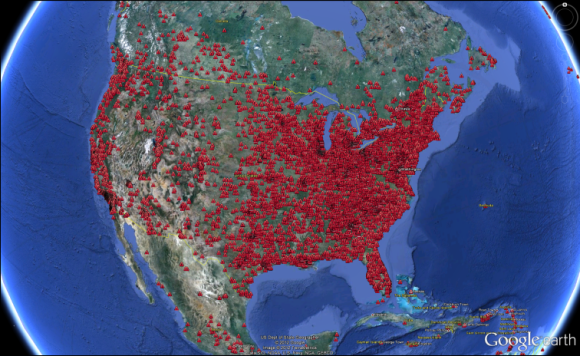
Some 2.2 million home networks worldwide are infected with malware controlled by the ZeroAccess botnet, the report estimated. In North America, one in every 125 home networks are infected with malicious software.
Map of the ZeroAccess botnet as it spreads across North America

"The ZeroAccess.net has grown significantly to become the most active botnet we've measured this year," Kevin McNamee, Kindsight security architect and director, said in a statement.
"Cyber criminals are primarily using it to take over victim computers and conduct click fraud," McNamee continued. "With ZeroAccess, they can mimic the human behavior of clicking online ads, resulting in millions of dollars of fraud."
Kindsight estimates that online advertisers lose $900,000 a day in fraud perpetrated by ZeroAccess.

Big money for evil-doers

Spam, add-click malware, banking Trojans, theft of identity information, and fake security software are big money makers for cybercriminals, the report noted.
The cyber-security vendor also reported that it saw a 165% increase in the number of Android malware samples during the period. Nevertheless, despite the growth in spyware apps and malware, there have been no major malware outbreaks, the report said.
"Aggressive Adware," some of it bordering on spyware, continues to be a problem in the Android market, according to Kindsight. It estimates that three percent of all mobile devices host some form of that software.
While security software aimed at removing aggressive adware from mobile devices has been introduced into the market, the report explained, it remains to be seen how effective it will be in mitigating the problem.
Similar efforts were made in the past to address spyware problems in the Windows world, but the Android environment is a horse of a different color. "One key difference between these ad-funded Android apps and the traditional Window’s variety is that the Android variety is being distributed from the Google Play App Store, which lends them considerable legitimacy," the report said.
Source: pcworld.com

The Windows 8 ecosystem: 5 best and 5 worst features


Windows 8 hasn’t just arrived—it has arrived in full force, with an armada of ancillary products. Microsoft’s deployment of the new Windows platform across desktops, laptops, tablets, hybrids, and smartphones constitutes a major push to make Windows 8 your defining computing experience regardless of your hardware persuasion. Depending on your point of view, this can be a good thing or a very, very bad thing.
Or maybe it’s both.
Let’s take a walk through some of the triumphs and failings of Microsoft’s sprawling Windows 8 ecosystem. Like it or not, this is the environment that all new-PC users (and many PC upgraders) will be working with for the next few years.

The good

The great unification
Although Windows 8 stumbles in its attempts to push a touch-centric operating system onto desktops and laptops lacking finger-friendly screens, I’m nonetheless impressed by Microsoft’s execution in delivering a unified experience across all of its major consumer platforms. Windows 8 on x86-based tablets is the same Windows 8 that you can find on laptops and desktops, and this provides a tight degree of unification that’s missing from Apple’s product lineup, which is split between Mac OS and iOS.
You can access SkyDrive across pretty much all
your new Windows devices.
The linchpin is the new Microsoft Account sign-in (formerly Live ID). Through a single username and password, your Microsoft Account taps into the cloud and establishes common preferences among all the Windows-based hardware and services you may use (though regional barriers are still a problem; more about that below). So kudos to Microsoft for acknowledging that our computers, tablets, smartphones, and game consoles should be connected, sharing a common, user-specific experience.
From SkyDrive to SmartGlass to the ability to synchronize settings across environments quickly and easily, the new Windows 8 platform provides the essential core connections for all your software and gear.
Forcing a touchy issue
Since touch is the cornerstone of Windows 8—regardless of whether you actually have a touch-responsive display on your chosen device—Microsoft is pushing third-party developers to take the next big step in app creation. Simply put: Touch cannot be ignored. This mandate is an issue for people without touch-enabled hardware. And it’s bad news for people who have tried touch control but hate it. Yet Microsoft's new “the touch way or the highway” philosophy shows vision and innovation, and affirms the public’s overwhelming support for touch gestures on computing hardware.
Adopting a touch-centric approach will help move Microsoft
forward into the modern computing era.
Sure, some developers will never jump on the touch bandwagon, either because they don’t have an interest in advancing their users' experience, or because their software can’t benefit from touch in any way (after all, some utilities are so simple, one-dimensional, or keyboard-dependent that an investment in touch development wouldn’t make sense). Nonetheless, you can expect to see many more apps that tightly and creatively leverage touch support. These are the apps that will carry Microsoft forward.
And these are the apps that will ensure a consistent, high-quality user experience, regardless of which hardware you use to tap into the new Windows regime.
Leading by (hardware) example
Microsoft isn’t just reinventing its Windows platform. It’s also doubling down on a hardware strategy designed to lead by example, showing tablet manufacturers that tablet-laptophybrids are the future of PC computing.
Surface RT forces hardware partners to innovate
and advance the basic computing form factor.
Yes, I know: Pairing touch-based tablets with keyboards isn’t a new idea. Other parties have done it before, with Asus being the most effective. But Microsoft’s elegant execution of Surface RT, with its keyboard-cover accessories, sets a high bar for what a Windows 8 tablet-laptop hybrid should be. What’s more, because Surface RT is Microsoft’s first foray into computer manufacturing, the company will now compete with its hardware partners, and this might lower prices and encourage the creation of better, more interesting, more innovative computers across the entire Windows 8 ecosystem.
In essence: Consumers get more choice, and better products to pick from. Microsoft, meanwhile, achieves faster market-share gains for Windows 8. The new Surface tablet isn’t just the premier hardware component in the new Windows ecosystem—it’s actually a catalyst for greater ecosystem success.
Fearing giants promotes innovation
Now that Microsoft has committed to the brave new world of touch—and smartphones and tablets—it has to deliver the goods. It’s now competing directly with the iPad and iPhone. It’s now competing with scads of Android devices. This isn’t necessarily an enviable position given Microsoft’s uphill climb, but it will definitely drive innovation, and that bodes well for the Windows ecosystem as a whole.
In short, Microsoft has to get very creative, very quickly. Ultimately this challenge will benefit consumers the most. Microsoft will have to drive new features throughout its platform, especially new ways for all of the hardware components to interact with one another. And this is an opportunity that neither Apple nor Google really gets to explore, since Apple splits its ecosystem between Mac OS and iOS, and Google doesn’t even have a computer OS.
Apps such as Xbox SmartGlass, and services such as the SkyDrive cloud platform and Xbox Music streaming, are great starts. But what else can Microsoft do to persuade users to abandon their existing devices and ecosystems, and leap head-first into Windows 8? More important, how fast can Microsoft pull that off? These are scary questions for Microsoft, but I think standing in place doing nothing is an even scarier option.
Joining the app-store masses
Apple had one first. Then Google got one. Now, finally, Microsoft has one too: a software store. It’s not for your Windows Phone 8 device, but for Windows itself. And the new Windows Store is the only place you can download “Windows 8 apps,” the Start screen-centric programs previously known as Metro apps.
The new Windows Store ensures a reliable
user experience for PC neophytes
Although the move has frustrated developers who create software that Microsoft doesn’t want—either a result of a particular app falling short of Microsoft’s guidelines, or the fact that Microsoft isn’t opening the Windows Store to the full purchase of desktop applications—it’s nonetheless a powerful driver in making Microsoft’s ecosystem more accessible, more convenient, and more secure for users.
The Windows Store is a great step forward; but in order to recognize its benefits, you can’t look at it through the eyes of a power user. Envision, instead, the typical technological neophyte who wants access to online shopping, streaming movies, financial information, games, rudimentary media editing, and all the other simple services that computers make possible. Throughout their computing lives, these novices have been tempted numerous times: A Web ad has asked them to install something they shouldn’t. Or they’ve installed software upon the recommendation of a friend, but that software isn’t compatible with their system. Or, even sadder, these newbies might not even know how to find and download new programs for their PCs.
The Windows Store gives such users a simple and secure entry point for downloading apps that have passed stringent certification from Microsoft itself. Sure, an app might ultimately stink, but at least users now have strong assurance that the software won’t muck up their systems. To wit: Apple’s App Store went more than five years before succumbing to its first piece of malware, and the company quickly expunged the app so that no new user could download it ever again.

The Bad

Friendly compromises that were never made
To construct a user experience that works fairly seamlessly across desktops, tablets, and smartphones, Microsoft had to make some compromises, and these trade-offs are affecting desktop users the most. Although it’s relatively easy to operate a touchscreen-oriented interface on a device with an actual touchscreen, it’s not so easy to translate touch gestures to the world of mice and keyboards. Power users aren’t happy with Microsoft’s new Windows 8 mouse gestures, so you can only imagine how well they’ll be received by the enterprise market, and by all of our grandparents.

In some cases Microsoft didn’t even have to make compromises, but still opted to restrict the user’s ability to navigate Windows in a familiar, friendly way. The company had ample opportunity to give users choice and freedom in its construction of Windows 8, but decided not to.
Want a Start menu? We won’t show it by default, but you can enable it if you really need to. Don’t like the Start screen? That’s totally cool. We’ll make it so that you can still access it, but we won’t force you to deal with it up front each time you start the OS. Don’t need a lock screen since you’re on a desktop computer instead of a tablet? Great. We won’t force you to “reveal” your password prompt. Or at least, we won’t bury the option that lets you eliminate this.
That’s how Microsoft’s internal dialogue could have sounded. But in the real world, Microsoft chose differently. In creating a common ecosystem for Windows 8, Microsoft has shifted portions of its new user interface into places where they don’t need to be.
Common interface, uncommon apps
The scariest part of the Windows 8 ecosystem is the fact that Microsoft has put a good chunk of the potential success of its OS—across PCs, tablets, and smartphones—in the hands of third-party developers. Even though it’s premature to declare Windows 8 a complete dud in terms of available apps, we have to be concerned about the critical dearth of apps that one would otherwise expect to find on a major new platform. Windows 8 has no official Facebook app, no official Twitter app, and no Instagram. And those are just three of the most obvious omissions.


Windows Phone 8 devices bear a similar interface
to Windows 8, but they can't run Windows 8 apps.
The app situation could very well change in a few months, so I won’t quibble about specifics. After all, Microsoft execs have stated that they hope to have 100,000 apps in the Windows Store within 90 days of the Windows 8 launch.
What’s worse for Microsoft is the way that it has decided to treat the Windows Stores on smartphones, tablets, and desktops, walling them off in separate silos instead of unifying all of the environments. How cool would it be to buy a copy of Microsoft Office, and receive a version geared for your Windows 8 smartphone and for your Windows 8 desktop or tablet? Or, for that matter, wouldn’t it be nice to purchase rights to run your favorite Windows 8 smartphone game on your tablet?
But, no, that’s not happening.
A Windows 8 tablet or hybrid is the functional equivalent of a laptop, which shares the same Windows Store as your desktop PC (unless you’re running a Windows RT-based tablet; I'll get into that below). In contrast, a Windows Phone device—whose interface inspired Windows 8 and exhibits many of the same behaviors and features of Windows 8—taps into a completely different software store. Phone apps share a common code with tablet and PC apps, but they can’t directly transfer over to your tablets and PCs.
The sins of Windows RT
If you thought the Windows 8 ecosystem was confusing enough in terms of app support, you ain’t seen nothing yet.
Windows 8 RT has entered the fray, too. If the Windows 8 ecosystem of desktops, laptops, tablets, and smartphones were a great land mass, then Windows 8 RT would be an island off the coast. It’s under the mother country's protection, and it likely enjoys much of the same climate and vegetation, but it’s still separated enough to be its own little, self-contained world.
The desktop in Windows RT is little more than
a home base for Microsoft Word
and file management
Microsoft representatives have had trouble explaining the differences between Windows 8 and Windows RT in the months leading up to Windows 8’s big launch. And if they can’t get it right, how is an average consumer supposed to understand that Windows RT is a stripped-down OS version that won’t run desktop applications, save the ones that come preinstalled? In a nutshell, the Windows RT desktop runs a junior edition of Microsoft Office and a motley crew of legacy utilities. That’s it, along with providing the basic file-management functions of any Windows desktop OS.
Microsoft might gain some depth-of-ecosystem advantages by opening Windows 8 to inexpensive (and energy-efficient) ARM processors; in fact, the move to support ARM extends the reach of the new Windows platform. But Windows RT also has the potential to create serious confusion for people expecting to jump between all Windows 8 devices without issues.
It’s commercial time
Never before has Microsoft been so unapologetic about tying its commercial interests so closely with the raw mechanics of its OS ecosystem. Although you’re free to set up your own default applications in Windows 8, or to install other apps to manage the multimedia as you see fit, there’s no question that Microsoft would prefer that you use its branded, tiled apps to watch or listen to content. And, oh, while you’re there, perhaps you might like to rent or purchase a movie or two from one of the tiles advertised on your screen.
The Games app mostly feels like a storefront for,
well, games, including those designed for the Xbox 360.
It’s bad, folks. The Music app isn’t so much a media player as a storefront for Xbox Music. The Games app isn’t so much a portal for installed games as a platform for buying Windows 8 games—and even Xbox 360 games. And the same conceit holds true for the Video app. These are sales tools, not user-focused programs, and the sales pitch persists throughout the Windows ecosystem.
Android—and even iTunes, to a lesser extent—separates commercialization from content to such a degree that it’s there if you want it, and you know how to reach it, but it isn't in your face, atop a lackluster multimedia player (or games browser). But in the new Windows ecosystem, no matter what you’ve paid for your device or for your subscription content, advertising is now a part of the norm. That’s not fun.
Region migration?
Although this issue won’t affect the mainstay of Microsoft’s Windows 8 user base, one of the problems Microsoft has now created in unifying its ecosystem under a common account—the Microsoft Account—is that transferring your account between regions is about two degrees short of impossible. In other words, if you’ve done a lot with your old Live ID in Europe, for instance, and are about to move to the States, you’re in for a bit of a shock: Your new Microsoft Account will remain tied to the country where you created it.
Unfortunately, at the moment you can't just open a drop-down menu in some options panel and change over from, say, England to the United States. Without the ability to make such a switch, users lose the capability to pay for the very services Microsoft offers—apps, Xbox Live points, and the like—in addition to losing access to any region-locked apps, games, services, or subscriptions they’ve already ponied up for.
What would have been an annoying issue in previous years is even worse now that Microsoft is tying a number of Windows 8’s more compelling features to a user’s online account. Microsoft’s standard solution—create a new Microsoft Account—just doesn’t cut it anymore, not when the goal is to have a single sign-on for the entirety of the Windows 8 ecosystem.
The real solution is twofold. First, Microsoft should give its users the opportunity to switch their billing country without hassle. And second, those people who already took Microsoft up on its advice to create multiple accounts need the ability to merge multiple accounts into one.

Source: pcworld.com


Microsoft releases Windows Phone 8 SDK


One day after the launch of its next generation mobile operating system, Windows Phone 8, Microsoft has released the SDK (software development kit) that will allow programmers to write applications for the new platform.
Microsoft released the software for the kick off of its developer focused Build conference, being held this week in Redmond, Washington.
In Tuesday’s keynote address at Build, Microsoft CEO Steve Ballmer admitted that, thus far, Windows Phone has not sold in significant numbers. He said he expects this to change with the recent releases of Windows 8 and Windows Phone 8.
“I think most folks in the room know that Windows phone is a small volume player,” he told the audience of developers. “But we have the most differentiated approach to the market. We have absolutely killer hardware and there will be hundreds of millions of Windows users who will want a Windows phone,” he said.
“With the launch of Windows Phone 8, the phone enters in full fruition as a first class member of the Windows family,” Ballmer said. Nokia, Samsung and HTC are all in the process of releasing Windows Phone 8 handsets.
Windows Phone SDK 8.0 provides a stand-alone IDE (integrated development environment), using the Visual Studio Express 2012 edition, for developers to build windows Phone 8 applications. It also provides an add-in to the Visual Studio 2012 Professional, Premium or Ultimate editions.
The SDK also includes a number of different emulators for testing a program against a specific smartphone. Other testing and profiling tools have been provided as well.
Microsoft received a fair amount of criticism for not releasing the SDK sooner, so that developers could have built more applications prior to the official launch of Windows Phone 8. The new OS offers many unique features — such as live tiles, selective sharing and near-field payment communications — that developers will need to become acquainted with in order to make their apps as appealing as possible.
Microsoft did release a preview version of the SDK to select users in September.
In conjunction with the Build conference, Nokia has also launched two programs to help programmers get up to speed on the new platform. One, called the Nokia Ad Exchange, provides an easy way for developers to build advertising into their applications. The second, called the Nokia Premium Developer Program, provides a set of controls and support for developers.
Source: pcworld.com